Stop pushing to debug your workflows
Overwire runs your GitHub Actions workflows locally.
Skip, mock, or live-execute any step, and simulate the platform around the run.
Watch the run, not the log scroll
Jobs, steps, and modes on one canvas. The map updates as the run executes, so you can see what ran live, what was mocked, and what was skipped.
Run the workflow,
mock everything around it
Skip, mock, or live-execute
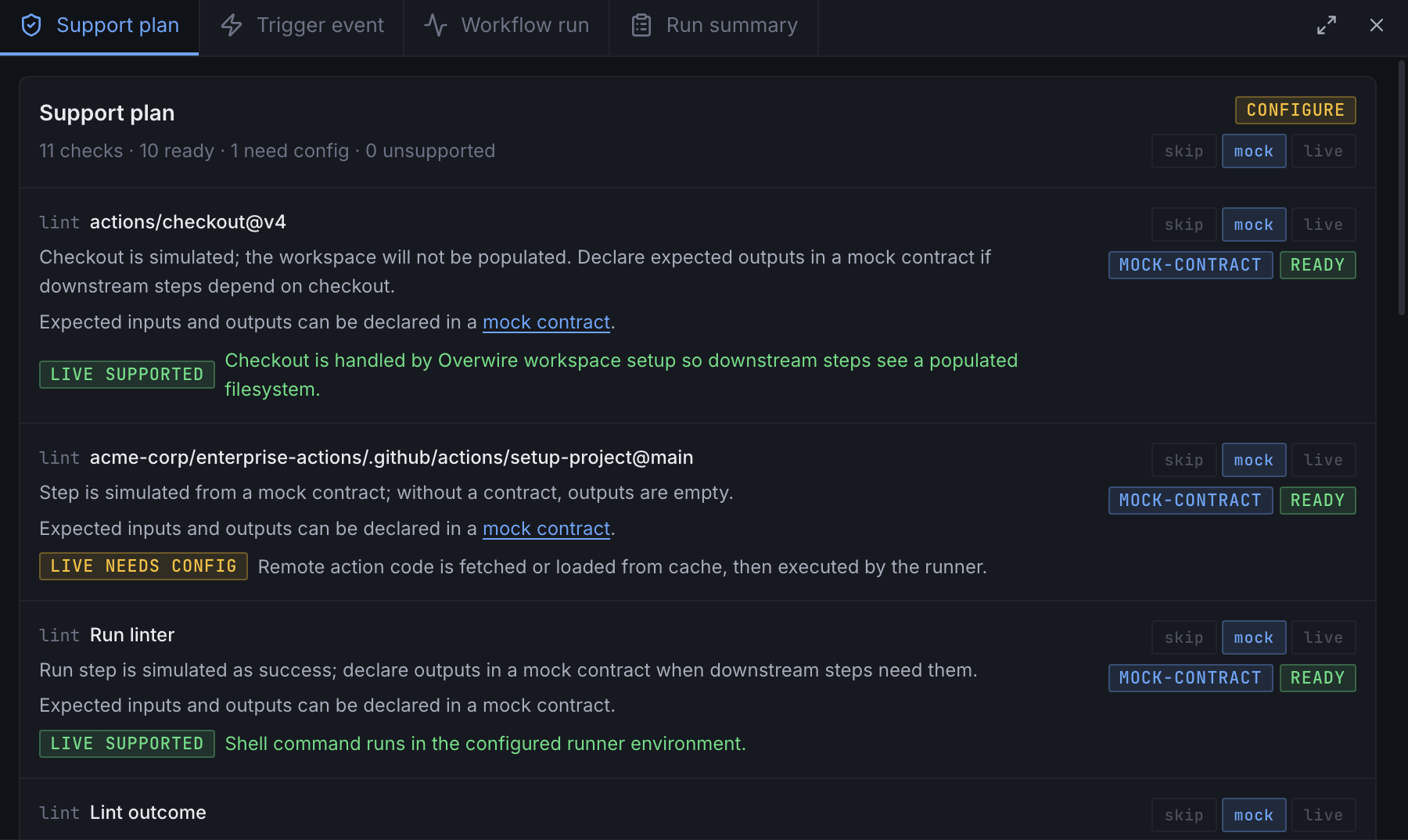
Every step gets a mode. Skip what you don't need, mock third-party actions against a declared contract, live-execute the rest in a real container.
Real runner container
Steps execute inside a Docker container that mirrors the GitHub Actions runner environment. Same tools, same paths, same behavior.
Multi-repo workspacesPro
Test workflows that span multiple repositories. Overwire manages workspace peers and resolves cross-repo references.
Governance and rulesetsPro
Validate branch protection rules, required status checks, and CODEOWNERS locally before pushing.
API mocking
Declare mock responses for GitHub API calls. Unmatched requests are captured and turned into suggested mocks.
Full expression engine
Evaluate ${{ }} expressions against real workflow context. Matrix expansion, needs references, and all GitHub builtins supported.
Init, configure, run
Initialize
Run overwire init in your repo. It scaffolds a .overwire/ config directory alongside your existing .github/workflows tree.
$ overwire initConfigure modes
Set each step to skip, mock, or live. Mock contracts declare expected inputs and synthesized outputs for external actions.
Run locally
Execute the workflow. Live steps run in a Docker container and logs stream as they happen. Iterate without pushing.
$ overwire run build.ymlKnow the merge outcome before you push
Workflows depend on more than their steps. Overwire reproduces the platform surface they run against, all of it backed by plain files in your repo.
Branch rulesets and required checksPro
Import GitHub ruleset exports and evaluate them against local runs.
PR scenarios with merge predictionPro
Define pull request scenarios and see whether the merge would go through.
Commit statuses and check runsPro
Seed external statuses so required contexts resolve the way they would upstream.
Environment approval gates
Protection rules pause the run and wait for your approval, locally.
Variables and secrets
Plain config files back the vars and secrets contexts. Values stay on your machine.
API mocks with capture and suggest
Declare mock routes. Unmatched API calls are captured and suggested back to you.
- ci / build (push)success
- ci / test (push)success
- lint / eslintin progress
- security / scanexpected
routes: - method: GET path: /repos/{owner}/{repo}/releases/latest status: 200 body: { tag_name: v2.3.1 } # captured from the last run - method: POST path: /repos/{owner}/{repo}/statuses/{sha} status: 201Pricing
The app and the CLI are both free. Pro unlocks multi-repo workspaces and governance simulation.
The full desktop workbench: live run canvas, streaming logs, watch mode, run comparison, expression debugger, re-run from any step, and every config editor. Plus the full CLI with chains, history, and mock generation.
or $96/year (20% off)
Multi-repo scale and governance simulation for teams with complex workflow infrastructure.
One seat, 3 device activations.
Get Pro- Multi-repo workspaces
- Governance simulation: rulesets and required checks
- Organization-level rulesets
- Custom repository properties
- Commit statuses and check runs
- PR and merge-outcome prediction
founding price for the first 500 seats; $249 after
For people who would rather own their tools than rent them.
One seat, 3 device activations.
Buy Lifetime- Everything in Pro
- A perpetual license, yours forever
- Every future update included
Pricing FAQ
- How many devices can I use?
- A seat is one person and covers 3 device activations: a laptop, a desktop, and a reinstall. You can deactivate a device yourself from Settings to free a slot.
- What does “lifetime” mean exactly?
- Pay once, use Overwire Pro forever, every update included. There is no update window, no renewal, and nothing recurring; your license never stops working.
- I lost my license key.
- Keys are tied to your purchase email. Recover them any time through the customer portal of Polar, our merchant of record. No support ticket needed.
- What’s the refund policy?
- Every first purchase, subscription or lifetime, can be refunded in full within 14 days, no questions asked. Renewals aren't covered; you can cancel any time before your renewal date from Polar's customer portal. Refunds are handled by Polar, our merchant of record; the full policy is in the Terms of Service.
Debug at the speed of local.
Download the app for macOS or Windows, or install the CLI.
Installation guide